


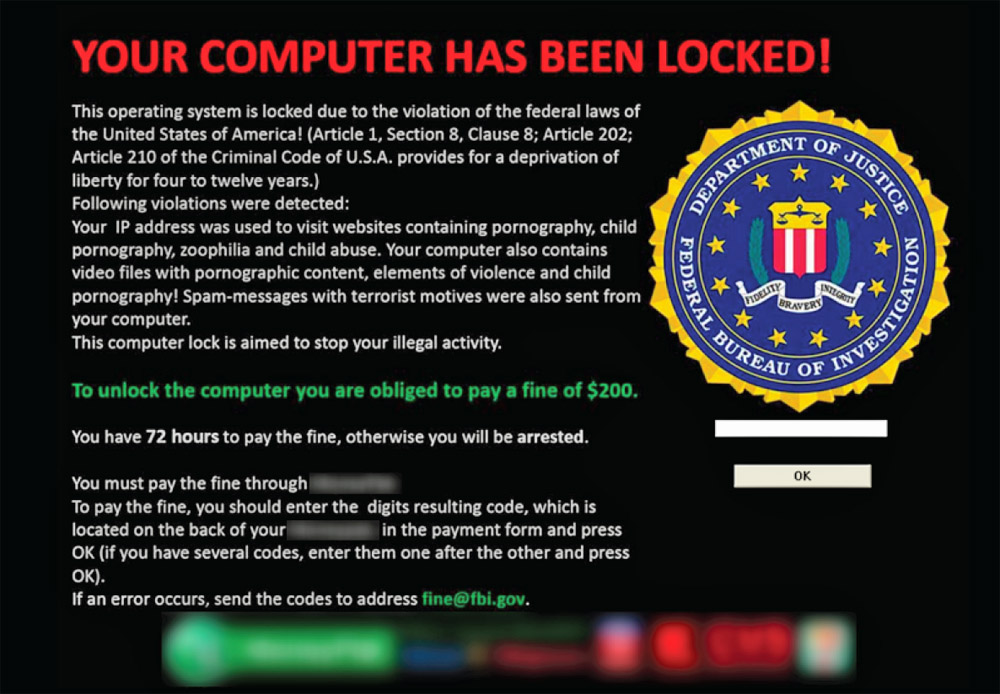
Ransomware is another form of malware that is one of the hardest forms of malware to remove. One of the worst things about ransomware is that it can come with other forms of malware such as viruses, trojans, and many other forms of malware. The main thing that you must keep in mind with ransomware is that antivirus software has a hard time detecting it. That and you will have a hard time removing it, so below I will go into ransomeware into great detail. I will also give you some tricks that you can do to try and remove it.
What Is Ransomware
Ransomware is a form of malware that is disguised as a legitimate program such as an antivirus program. This is why a lot of people tend to fall for these programs but what makes them worse is that they bring more malware with them to put your system in danger. You could say ransomware is some form of double agent that gets into your computer and looks like a friend but is really working for the enemy. It is pretty easy to notice ransoware once it is on the computer and it is infected but it may not be so easy when you are searching around on the web. The big hit for your computer is some weird fine or cost to use the program or in the case of the money pack scam a way to unlock the computer.What Is It Meant To Do
Ransomware is meant to steal credit card information and to take your money. This is a form of scam that people have been making millions of dollars from. The above example is what is known as the money pack scam which is where the person gets that message and it blocks them from connecting to the internet. The worst part is even if someone does "pay to unlock their computer" it will still be locked.What To Do If I Have Ransomware Removal Guide
If you suspect that you have a ransomware program then you will need to determine your situation. Can I connect to the internet? Can I use a system restore? Generally your best bet is to try a system restore and if that does not work then you will need to try some other tools.
1. Use the AVG rescue CD. This nice tool is very nice for detecting malware and removing malware that is preventing your computer from starting up. It can be downloaded here. Download from another computer and burn it to a dvd like they show on the site.
2. After you have run the tool and you launch your computer determine the situation. Can you connect to the internet? If so then continue with the steps with the letter A marked. If not then follow the numbers with the letter B attached to it.
3A. So now you can connect to the internet you will need to go to another site and scan your computer for malware I recommend using Hit Man Pro which can be downloaded here.
3B. So you can't connect to the internet which means that you still have malware attached to your computer. So instead of you trying to go into the registry right away lets try to use another tool to remove the malware. I recommend that you try the Kaspersky Rescue Disk to try and remove more malware. You can use a Disk or a USB for this scanner. This disk can be downloaded here.
4A. After you have removed any remnants of the malware I recommend that you download some sort of antivirus. I have created a guide on securing your computer which you can see here.
4B. Alright now that you have used both of those rescue disks your computer should be able to connect to the computer but lets just say that it does not below I will give you some more tips.
5A. After you have selected your choice of antivirus and firewall then you should be good just remember to not download anything that seems suspicious unless you are in a testing environment.
5B. You can try one last rescue tool and if that does not work we will need to find the files manually. The last tool that I recommend using is the Hitman Pro Kick-start which will scan everything on boot up and remove it. The best thing is that this tool can remove the money pack scam. You can download that here.
6A. You have concluded this part of the removal and protection process.
6B. After all of that you should be able to boot up the computer and log into the internet. After that follow my guide on protecting your computer from malware and you should be safe. That guide can be found here.
**If that does not work still then please try getting a friend to help you remove the files by hand**


.png)


0 comments:
Post a Comment