DailyExposition

  • Subscribe to our RSS feed.
  • Twitter
  • StumbleUpon
  • Reddit
  • Facebook
  • Digg

Tuesday, April 30, 2013

Does A Home User Need To Pay For Antivirus?

Posted on 6:00 PM by Unknown


There are a lot of people out there who think that it is necessary to pay for an antivirus program, but the sad truth is that is not true at all. While paid programs do offer more protection the average user won't do anything that a free program like Avast, or Ad Aware couldn't handle. If you are business then yes pay for the extra protection because there is a lot of vital information on those computers, but the home user does not need it. People think that if it is free it is not effective but the sad truth is on tests the paid version does score slightly better sometimes but most of the time they are EQUAL.

Why Is Free Antivirus Good


To make it simple when it comes to protecting your computer from malware such as viruses and trojans a free program is effective to keep you safe. You also don't have to shell out the money to pay for the license of the paid version. To make it simple when an antivirus program scans your computer is looks at what the file is doing and sees if it is in the database. A paid program and a free program still have access to the exact same database so why pay. While malware is evolving and becoming more complex there are a lot of free programs for your computer that save you money and are just as good.

Paid Comes With More Features

That is true a paid program does come with more secure features, but let me ask you. Do you know how to use those features? If yes then the offer might entice you. But if you don't you are taking their word thinking it is more secure even though you have no clue how it works. While the features are nice you don't need them for a home user. When will you need to configure your own custom firewall and block ports? Most people don't know what that means or how to set it up. So it is not necessary for you so don't waste your money on it.

What Should I Do Then?

You need a good combination of firewall and antivirus. So I have a guide that can be found here on that but below I will give you a basic set up that I recommend.

Avast Free Antivirus- Really good protection simple and comes great right out of the box.
Online Armor Free Firewall- One of the best firewalls in the industry and comes with a lot of nice features to protect your computer.
Spyware Blaster- Does not provide protection, but they update the program to add unsafe sites to your block list.

Links

Avast- http://www.avast.com/en-us/index
Online Armor- http://www.online-armor.com/products-online-armor-free.php
Spyware Blaster- http://www.brightfort.com/spywareblaster.html
My Article - http://thedailyexposition.blogspot.com/2013/04/how-to-secure-my-computer-for-free.html

Read More
Posted in Computer Support, general, malware | No comments

Monday, April 29, 2013

What Is Adware

Posted on 6:00 PM by Unknown

Adware one of the most commonly misunderstood form of malware right next to the common virus. The issue with Adware is people try to assume that they know what it is but the thing to keep in mind with Adware is it rarely comes alone. When it comes to malware Adware is one of the most common types but it is generally coupled with a form of malware such as a Trojan or spyware. None of these will break the computer, but they are annoying and can get some information about you if you are not careful.

What Is Adware


Adware is a form of malware that as it title says is meant to get revenue for the creator in the form of ads. Now they are generally harmless depending on the ad agency that they used but many of them can get your private information. Most forms of adware come in the form of a toolbar. This is because they can easily integrate into your web browser making it really easy to display the ads. They are generally shown from some sort of java code so turning off java should end the ads but we want to get rid of them permanently.

Removal

This is very dependent on the type of malware that you have on your computer. If it is a toolbar then that is very simple to remove and I have explained that in an article which is located here. But what if this is not a toolbar and is a file. This is where it gets to be annoying, because we either have to find the file its self or use a variety of malware scanners. Since it would be to difficult to diagnose every type of adware that there is and where it is located we will use scanners to do the work for us. But you must first ask yourself have I downloaded anything recently? If so what was it. Generally adware is contracted through some sort of download so first look at every program that you have downloaded. If it is not from a trusted company such as Microsoft or adobe then LOOK THEM UP. Chances are that is where the malware is coming from.

Now let's say that your malware is some form of file and not a program. I am not going to force you to look through folders and thousands of files. That would take hours, and it is just unnecessary. So we will be using scanners to do all of the real work for us. Scroll down to the bottom of this post for the links to the scanners. Use HitmanPro first this will probably find all of the malware first and it does not require you to install it.

Protection

As always you should have antivirus and a functioning firewall for your computer. I have written a guide on protecting your computer from malware. The guide is located here and gives you free recommendations to protect your computer.

Scanners


HitmanPro: http://www.surfright.nl/en/hitmanpro/
Panda Active Scan: http://www.pandasecurity.com/homeusers/solutions/activescan/
Malwarebytes: http://www.malwarebytes.org/
Super AntiSpyware: http://www.superantispyware.com/
Bitdefender Quick Scan: http://quickscan.bitdefender.com/

Use This One At Your Own Risk. The power eraser is very sensitive.
Norton Power Eraser: http://security.symantec.com/nbrt/npe.aspx

Read More
Posted in malware, malware encyclopedia | No comments

Sunday, April 28, 2013

Host Gator Coupon Codes

Posted on 3:52 PM by Unknown

After that three part review some of you are probably looking to buy a hosting service form Host Gator. However, that does not sounds right to me so I am giving 3 coupon codes that can be used on the Hosting Plans for Host Gator. Please remember that when using these you will go through the buying process and during the check out process at the end you will be asked if you have a code. If you have one which you do now you can apply it.

You may only use one of these per checkout. 
Name          Discount
25percent    25%  off
spring          20% off
green           20% off
hgc25          $9.94 off

Make sure that you share the codes with your friends who are also looking to buy and host their own website. Please note that there are some stipulations with hgc25 you buy a $6 plan and make money. You can only apply that to certain orders, and you will be prompted that during the checkout process.
Read More
Posted in coupons | No comments

Host Gator Vs Go Daddy Part 3

Posted on 3:38 PM by Unknown


The final comparison to see who truly is the better host for your website. So far Host Gator has won every round but will that change here? That is hard to tell but in the end you will be able to decide which hosting service that you want to use. The final part of this review we will go over all of the facts to make your choice easier. Now you will be able to see if the cost vs features of these hosting plans is really worth it to you. You should also look at the other two parts to see if you would want one of the cheaper plans.


Go Daddy $7.49


24/7 Phone/Email Support-  This is something that has become an industry standard so now medals go to anyone here.

Unlimited Bandwidth this is kind of a standard for web hosting services.

Unlimited Websites- This is a huge upgrade because with their earlier package we were only getting 1 website for this so now we can have as many as we want so we don't need multiple plans.

Unlimited Disk Space- Way better than that limit of 100gb this means you will never have to worry about running out of space for videos, pictures or anything else that you want to upload. So from the beginning of 100gb we now have unlimited which we all like.

Unlimited Databases- 2.5 times of what we had with the basic package and it allows us to do a lot more than we could have before.

Unlimited Email Addresses- You are now allowed to have more workers to have a registered email for your website. This is key for growth of your business it also allows you to have more writers registered for your site.

$100 Of Bing Ads Credit-. This is something that is very very specific because you must buy a certain amount of ads and then the credits will apply. You will also notice you can't buy the ads with a gift card.

$50 Of Facebook Ad Credit- Again you need to read that fine print because there are a lot of rules that apply. So be careful they are not really giving you anything special.

Customizable Mobile Site- This is something that most site builders already include and there are a lot of websites that can walk you through to do this manually so you are not in any danger here.
So as we can see this is a major improvement over the previous comparison for them, but let's see what Host Gator did for us.

Website Accelerator- This tool is supposed to give information about your site and it will help you with speeding up its load time. This is key because if a site takes to long to load then less people are going to read it.

Premium DNS- Basically it is Go Daddy's tool for repairing errors on your site. It will help you fix any 404 errors, and it is really useful if you can't identify the errors.

SSL Certificate- This is a 256 bit encryption for your site, and this is required if you want to sell items on your website. This basically encrypts the users payment method whether it is a credit card or Paypal purchase this will secure their information.

Malware Scanner- This is hard to actually judge because I don't know how they scan for malware or what service they are using. There are a lot of services that do this but having more than one is a great idea.

Host Gator $10.36


24/7 Phone/Email Support-  This is something that has become an industry standard so now medals go to anyone here.

Unlimited Bandwidth this is kind of a standard for web hosting services.

Unlimited Websites- This is huge because you will save so much money and you don't have to worry about running out of anything because you get unlimited everything (practically) with Host Gator

Unlimited Databases- Again Host Gator topples over Go Daddy by giving us unlimited databases which is better than that of the 25 you get from Go Daddy.

Unlimited Email Addresses- Unlimited is better than 500 in my opinion, but that might just be me.

$100 Google Adwords Credit- After you spend $25 of ad credit you get 100 which sounds like a good deal to me. This is great for growing your business.

Website Builder- Host Gator gives you its feature rich C-Panel website builder which is very common in the industry because it is easy and gives power users a lot of toys. This also allows you to build a mobile site really easily with out much assistance.

Free Dedicated IP- This basically makes it to where your IP for your site won't change. This is very important, and a lot of hosting services don't allow this option because it can be costly.

Free Dedicated SSL- You will get your own SSL certificate just like you would from Go Daddy and it is also a 256 bit encryption which is very important for your web store.

Anonymous FTP/FTP Accounts- This is where you can create a sort of login service for your site so that writers or other owners can control certain things about the site. Make sure that you set their permissions to your own levels.

Your Own Toll Free Number- This is an amazing feature, but it does have 1 stipulation that is you only get 100 free minutes a month. You can pay to get more added through your account.

Ecommerce- The one thing Go Daddy won't beat is that Host Gator allows everyone to have their own web store, and as we know it is not hard to sell something through these services. 

Now in my opinion the Go Daddy plan is worse because it lacks the web store options which cost quite a bit if you bought is separately. I also don't know if I get my own account system or even a static IP. Not to mention that with Host Gator I get my own toll free number which I think is cool as long as it is used properly with added minutes.
Read More
Posted in Product Reviews | No comments

Thursday, April 25, 2013

Host Gator Vs Go Daddy Part 2

Posted on 8:48 PM by Unknown

The thing to keep in mind is with each of these companies plans you should start getting more features since you are paying more now the real question is can Go Daddy live up to it. Host Gator is a company that earned its name through loyal customers and good features. Or will it be crushed by the behemoth that is Go Daddy?

Go Daddy $4.49


24/7 Phone/Email Support-  This is something that has become an industry standard so now medals go to anyone here.

Unlimited Bandwidth this is kind of a standard for web hosting services.

Unlimited Websites- This is a huge upgrade because with their earlier package we were only getting 1 website for this so now we can have as many as we want so we don't need multiple plans.

Unlimited Disk Space- Way better than that limit of 100gb this means you will never have to worry about running out of space for videos, pictures or anything else that you want to upload.

25 Databases- 2.5 times of what we had with the basic package and it allows us to do a lot more than we could have before.

500 Email Addresses- You are now allowed to have more workers to have a registered email for your website.

$50 Of Bing Ads Credit-. This is something that is very very specific because you must buy a certain amount of ads and then the credits will apply. You will also notice you can't buy the ads with a gift card.

$50 Of Facebook Ad Credit- Again you need to read that fine print because there are a lot of rules that apply. So be careful they are not really giving you anything special.

Customizable Mobile Site- This is something that most site builders already include and there are a lot of websites that can walk you through to do this manually so you are not in any danger here.
So as we can see this is a major improvement over the previous comparison for them, but lets see what Host Gator did for us.

Host Gator $6.36


24/7 Phone/Email Support-  This is something that has become an industry standard so now medals go to anyone here.

Unlimited Bandwidth this is kind of a standard for web hosting services.

Unlimited Websites- This is a huge upgrade because with their earlier package we were only getting 1 website for this so now we can have as many as we want so we don't need multiple plans.

Unlimited Databases- Again Host Gator topples over Go Daddy by giving us unlimited databases which is better than that of the 25 you get from Go Daddy.

Unlimited Email Addresses- Unlimited is better than 500 in my opinion, but that might just be me.

$100 Google Adwords Credit- After you spend $25 of ad credit you get 100 which sounds like a good deal to me. This is great for growing your business.

Website Builder- Host Gator gives you its feature rich C-Panel website builder which is very common in the industry because it is easy and gives power users a lot of toys.

Ecommerce- The one thing Go Daddy wont beat is that Host Gator allows everyone to have their own web store, and as we know it is not hard to sell something through these services. 

Not much increase besides the amount of sites allowed is increased and your own ssl certificate is allowed on the site.

Winner Host Gator!
Read More
Posted in | No comments

Host Gator vs Go Daddy

Posted on 9:09 AM by Unknown


Battle of the web hosting giants we will look at the pricing and the features that you get with both of these services. By the end of this review you will be able to determine between these two hosting services it will come down to price vs features in the end and you will need to pick what it is that you will use. There will be no personal bias in this review for I will be strictly going off of their features and comparing it with the competition and factoring the price in at the bottom. So click the link below to see the full review of the battle of the web giants.

Lowest Prices/Features of Basic Plans

When it comes down to who has the lowest prices this will have to go to Go Daddy who has their plans starting at $2.99 while Host Gator has their prices starting at the slightly higher $3.96. While both of these are very cheap Go Daddy won but the real question is what do you get for this price.

Go Daddy $2.99

You get 1 free domain with purchase of any of their hosting plans. Keep in mind that this is only for the first payment the rest is up to you.

Unlimited Bandwidth this is kind of a standard for web hosting services.

24/7 Phone/Email Support- This is common but many people want the ability to call up their hosting services  and get over the phone help.

1 Registered Website- This means that you can only use 1 website on this hosting plan.

100GB Of Disk Space- This can be difficult to overcome if you upload a lot of pictures and video however you will not run out of storage space quickly. 

10 Databases- You may only use 10 different databases on this web hosting service. This is okay for 1 website but if you have a lot of them then you will notice a challenge because many scripts run better when connecting to their own storage. But keep in mind that you are in no danger of running out for 1 site.

100 Email Addresses- This is a very nice feature for a small web based business because it allows you to have an email address strictly for your business and leave your other emails untouched.

$50 Of Bing Ads Credit-. This is something that is very very specific because you must buy a certain amount of ads and then the credits will apply. You will also notice you can't buy the ads with a gift card.

$50 Of Facebook Ad Credit- Again you need to read that fine print because there are a lot of rules that apply. So be careful they are not really giving you anything special.

Site Builder- Go Daddy's custom site builder is very easy to use but has been critized to lack features.

HostGator Hatching $3.96 Plan

Bandwith- Unlimited again this is the standard and your bandwith will be key for having a larger website you never want to restrict your bandwith.

Disk Space- Unlike Go Daddy this plan gives you an unlimited storage

1 Domain- Very similar to Go Daddy as you are allowed to only have 1 url registered at a time.

24x7 Phone/Email Support- This is common but many people want the ability to call up their hosting services  and get over the phone help.

$100 Of Google Adwords Credit- Nice that they give a disclaimer saying that it is only after spending $25 this is better then Go Daddy where they hide the information with a little box.

Unlimited Email Accounts- Nice that his is included with your basic plan because it gives your site more room to grow without spending more money.

Shared SSl- This is a form of SSL certification which is key when it comes to selling items from your site.

Shopping Carts- Yes for the basic plan you can sell items unlike Go Daddy were you have to pay for that separately on all plans. 

Site Builder- The classic C-Panel used in Host Gator is very simple that anyone can use it and it includes more features than that of Go Daddy.

Summary Host Gator Wins

While both of these companies offer very nice starter plans from features to price Host Gator wins. But if you are looking for a slightly cheaper host with more limitations then you could argue Go Daddy but from these features to price cost it is obvious that Host Gator is the winner.
Read More
Posted in Product Reviews | No comments

What Is Scareware

Posted on 7:14 AM by Unknown
Scareware is a form of malware that is meant to scare the user to think that their machine is infected with malware. This is a large distributor of malware because so many fall for its trick. So below I will cover all you need to know about this form of malware and what to do if you come in contact with scareware. As always you should never download anything that it tells you to or your computer will be infected. Scareware was very popular a couple years back but it has slowed in recent times.


What Does It Do

Scareware is generally seen in the browser or it will pop up on the screen. It will say something like windows is running a virus scan and it spits out a menu telling you to download some software. This software comes with a trojan and some sort of ransomware. This why it got the name of scareware while they themselves don't contain malware they do encourage the download of it. Generally it is in the form of trojans and ransomware.

How Do I Detect It

You will be able to detect them fairly quickly but the trick is to not fall for what it says. For instance you might get a pop up saying windows is scanning for viruses  The first issue is nothing in windows will tell you that it is scanning for viruses. Many programs do however windows its self cant. Another thing is after the scan it prompts you to download a program. Now the real issue if windows could scan for viruses then why cant it remove them without this other software. That is because this is a malicious download. You will not be able to tell before hand unless you have a tool that tells you whether a site is safe or not before you go to it.

Protection?

There are not a lot of ways to protect yourself other than to not download the software that it tells you. You should also avoid popups and ads that tell you that there is something wrong with your machine. These are generally a bad sign unless you are using something such as the bit defender quick scan.

Summary

While these are generally harmless the best thing for you to do when online is never to download the program that they tell you to. You should also try making your browser more secure by adding extensions such as WOT or read my article about Securing Google Chrome.
Read More
Posted in malware, malware encyclopedia | No comments

Wednesday, April 24, 2013

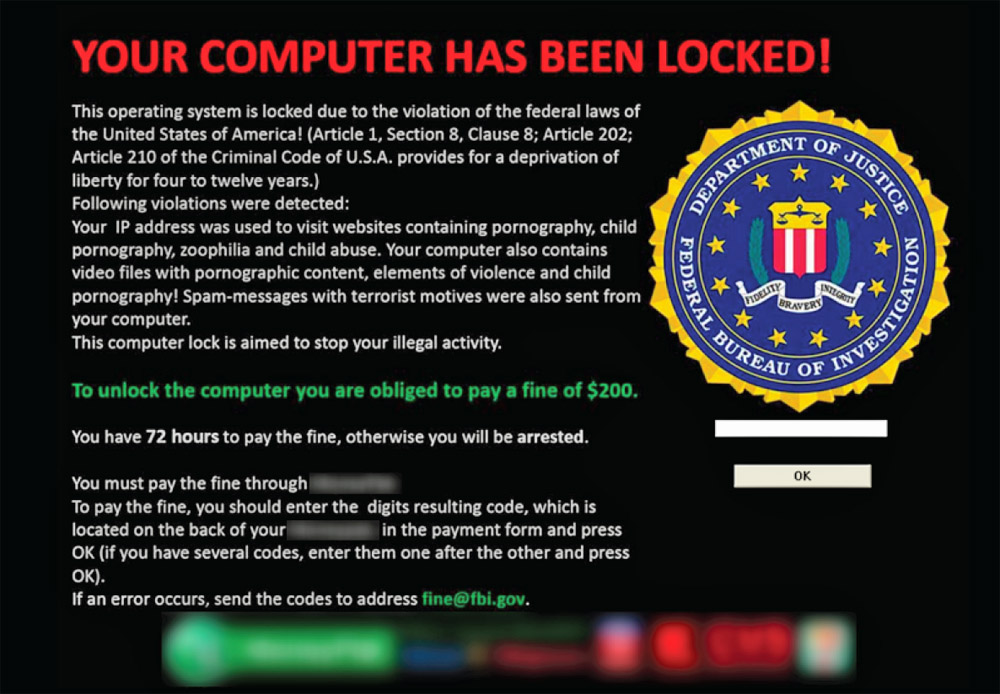
What Is Ransomware

Posted on 8:40 AM by Unknown
Ransomware is another form of malware that is one of the hardest forms of malware to remove. One of the worst things about ransomware is that it can come with other forms of malware such as viruses, trojans, and many other forms of malware. The main thing that you must keep in mind with ransomware is that antivirus software has a hard time detecting it. That and you will have a hard time removing it, so below I will go into ransomeware into great detail. I will also give you some tricks that you can do to try and remove it.


What Is Ransomware

Ransomware is a form of malware that is disguised as a legitimate program such as an antivirus program. This is why a lot of people tend to fall for these programs but what makes them worse is that they bring more malware with them to put your system in danger. You could say ransomware is some form of double agent that gets into your computer and looks like a friend but is really working for the enemy. It is pretty easy to notice ransoware once it is on the computer and it is infected but it may not be so easy when you are searching around on the web. The big hit for your computer is some weird fine or cost to use the program or in the case of the money pack scam  a way to unlock the computer.

What Is It Meant To Do

Ransomware is meant to steal credit card information and to take your money. This is a form of scam that people have been making millions of dollars from. The above example is what is known as the money pack scam which is where the person gets that message and it blocks them from connecting to the internet. The worst part is even if someone does "pay to unlock their computer" it will still be locked.

What To Do If I Have Ransomware Removal Guide

If you suspect that you have a ransomware program then you will need to determine your situation. Can I connect to the internet? Can I use a system restore? Generally your best bet is to try a system restore and if that does not work then you will need to try some other tools.
1. Use the AVG rescue CD. This nice tool is very nice for detecting malware and removing malware that is preventing your computer from starting up. It can be downloaded here. Download from another computer and burn it to a dvd like they show on the site.
2. After you have run the tool and you launch your computer determine the situation. Can you connect to the internet? If so then continue with the steps with the letter A marked. If not then follow the numbers with the letter B attached to it.
3A. So now you can connect to the internet you will need to go to another site and scan your computer for malware I recommend using Hit Man Pro which can be downloaded here.
3B. So you can't connect to the internet which means that you still have malware attached to your computer. So instead of you trying to go into the registry right away lets try to use another tool to remove the malware. I recommend that you try the Kaspersky Rescue Disk to try and remove more malware. You can use a Disk or a USB for this scanner. This disk can be downloaded here.  
4A. After you have removed any remnants of the malware I recommend that you download some sort of antivirus. I have created a guide on securing your computer which you can see here.
4B. Alright now that you have used both of those rescue disks your computer should be able to connect to the computer but lets just say that it does not below I will give you some more tips.
5A. After you have selected your choice of antivirus and firewall then you should be good just remember to not download anything that seems suspicious unless you are in a testing environment.
5B. You can try one last rescue tool and if that does not work we will need to find the files manually. The last tool that I recommend using is the Hitman Pro Kick-start which will scan everything on boot up and remove it. The best thing is that this tool can remove the money pack scam. You can download that here.
6A. You have concluded this part of the removal and protection process.
6B. After all of that you should be able to boot up the computer and log into the internet. After that follow my guide on protecting your computer from malware and you should be safe. That guide can be found here.
**If that does not work still then please try getting a friend to help you remove the files by hand**
Read More
Posted in Computer Support, general, malware, malware encyclopedia | No comments

Tuesday, April 23, 2013

Comodo Dragon Review

Posted on 5:11 PM by Unknown
Comodo which is one of the most well known antivirus, firewall providers has had a browser known as Comodo Dragon. Comodo claims that there browser is more secure and more private then that of Google Chrome. Now from my test it would be hard to tell because I can't tell what it is that they have done to claim to be more secure. But as far as my review goes Comodo might want to get rid of that claim.


As you can see in the video above there is no real difference since it is still using the chromium technology to create the browser. However the one thing that you will notice is the built in Comodo Web Inspector. This little tool should in theory prevent you from going to infected sites. The sad thing is there is no sign of that being true because it does not scan the items before you click them. Now this may still protect you but there are plenty of other tools that scan them BEFORE you go to the malicious site.

Protection Rating

This is hard for me to judge because in order for me to do that I would need to compare this to the other tools and since I don't know how often they scan sites and how many daily. However as far as site scanning this thing has done poorly because this browser does not alert you BEFORE you head to the site. The worst thing is that if you want to use that web inspector plugin you have to download the browser because they don't want to put it on the chrome web store. This could be a poor way to move people to your product, but it is not working so far.

Functionality    7

Now this is a 7/10 for Chromium based browsers. This browser as you can see makes it to were I don't have my little settings tab up there, and I rely on the developer tools a lot. They may be moved, or they hid it so that no one can mess with their extension. Not to mention that it looks different from the traditional browser, and I really don't like some of the things that they have done to it.

Privacy?

This is something that I cant prove again they can claim to be more private but how do you know that? You don't they could be collecting the information if they wanted to and you could not do anything about it. So there main thing again is thrown out because we can't prove that. Unlike the protection module which can be easily replaced with better tools this privacy idea has no real replacement because you can't prove what the company does with the information.

Ruling- Don't Use

You don't need some stupid browser like this when you can get better tools for Google Chrome. Yes they claim this, and that but the issue lies that they need to prevent malware before you go to the site not when you have clicked on it.  This is the one thing that many antivirus companies need to understand, and many of them are adjusting. Such as Avast, Ad Aware, AVG, Norton, but not Comodo.
Read More
Posted in Product Reviews | No comments

Monday, April 22, 2013

2013 Lyrid Meteor Shower

Posted on 9:03 PM by Unknown

Streaming Live by Ustream
Above is the NASA UStream of the meteor shower. You will not miss anything from this spectacular event, and the best part being, is you don't need to go outside and look high and low for them. So kick back, get some popcorn and grab a drink and prepare for a show.
Below I will be going into some details regarding this shower.

When Does This Shower Occur?

The Lyrids meteor shower occurs generally April 16th through the 26th. This occurs every year and the peak time being changed every year. Sadly this year it was April 20th so we all missed that day.

Characteristics of the shower.

This meteor shower is known to create "fireballs" which is any meteor that is brighter than the nearby planets. These can cast shadows on the earth but do not last long and will eventually burn up in the atmosphere. However, they do leave a very long trail of smoke this trail will last a few minutes and then dissipate into the night.

What Do I Do If I Find A Meteorite?

If the shower is in your area and you do go to a crash site DON'T pick anything up and don't touch the meteorite. The best thing to do is contact your authorities who will get the area under control and likely send the meteorite to a research center.

You May Also Watch the Video On Any Of Our Sister Sites

http://thedailyexpository.blogspot.com/
http://dailyexpositions.blogspot.com/

If the site is lagging or the video is lagging try one of the other sites above to limit lag. You can also try the NASA site here!
http://www.nasa.gov/topics/solarsystem/features/watchtheskies/lyrids_2013.html
Read More
Posted in science | No comments

Sunday, April 21, 2013

What Is A Virus?

Posted on 8:10 PM by Unknown

Computer viruses are probably one of the most misused terms ever. The reason is everyone says I have a virus! Well that is not always the case and it is more likely a Trojan. The difference is a virus is a type of malware and it does not encompass every form of malware on the market. They are also not hard to get rid off, and I will be covering everything that you will need to about viruses.

What Is A Virus


Well a virus is a piece of malware that is made to infect a computer, and it self replicates it's self. The thing with viruses is they are meant to replicate themselves by attaching to a memory item. They will then seek out files in a computer and with their replicants they will then erase the information. So you can say that a virus' main purpose is to destroy and render the computer useless. These are commonly confused with a worm, but the purpose of the worm is to send information and send copies it's self over a network.

A virus can and will hide it self so that the host will not notice that they are infected. However it will eventually slow the computer down because the virus has made so many replicants of itself. Viruses are more of a nuisance rather than a threat because they won't steal information they just destroy.

Symptoms

The easiest way to detect a virus is by a computer slow down if you have not done anything to cause the slow down. You can also detect a virus if random files on your computer no longer exist. There is also the chance of you noticing that you log on and see a blue screen of death. Which will require you to re install windows. So it recommended that you properly protect your computer with an antivirus program.

Prevention

The only real way to prevent malware infection is to use safe websites and downloads. However you should have a proper antivirus and firewall installed on the computer. I have recommendations that I feel will keep your computer safe from malware of any kind. but you need to keep in mind that the best antivirus is you yourself. So please don't do anything stupid or your computer will be infected.

Removal

When it comes to removing malware there is a good chance that you had no antivirus protection or it failed you in the first place. So i will give you a good list of secondary malware scanners that can help you remove those pesky infections. No keep in mind that if one scanners come back with clean you could still be infected. So I recommend that you use 2 of the scanners below so that you can be assured that you are safe.

Scanners

HitmanPro: http://www.surfright.nl/en/hitmanpro/
Panda Active Scan: http://www.pandasecurity.com/homeusers/solutions/activescan/
Malwarebytes: http://www.malwarebytes.org/
Super AntiSpyware: http://www.superantispyware.com/
Bitdefender Quick Scan: http://quickscan.bitdefender.com/
Norton Power Eraser: http://security.symantec.com/nbrt/npe.aspx      DONT USE UNLESS SEVERELY INFECTED.
Read More
Posted in | No comments

32x32 Images

Posted on 7:07 PM by Unknown


Above is a group of images that you can use or download to use for your own website. You can use them like I do at the top as links to a variety of services. These images are perfect for a small space on your website. It is also better to have them on your own site to increase the load times of the images. If you don't have them locally then you will have to make your site go and retrieve those images when ever the website is loaded.
Read More
Posted in | No comments

Thursday, April 18, 2013

How To Remove Any Toolbar

Posted on 9:26 PM by Unknown

Toolbars are one of the most commonly downloaded forms of malware, and the issue that comes is they can be hard to remove, and they are annoying to deal with. For instance the ask toolbar is the most known, and it also contains many forms of adware and spyware. Now some people claim that it takes hours to remove this and to get there browser functional again, and well I have to say it is really not that easy for it to be removed. To completely remove all the registry items by hand is something that I don't recommend for a novice user because if you delete the wrong item your computer can have a BSOD and you will need to reinstall windows.

How Did I Get The Toolbar?


Well it is generally transmitted through sites such as Cnet and certain downloads include the option because they are getting paid to have it. Very rarely do people actively search out the Ask toolbar because of it's malicious intent unless it is for testing reasons. Most antivirus software does not block this, and it is concerning because this is malware and it needs to end. The fact that companies are including with their products is bad.

How Do I Remove It?

Well removing a toolbar is not difficult and for uninstalling it I recommend that you use the Iobit Uninstaller which allows you to remove any item, and it will delete remaining files and almost all of the registry items. You can use the basic uninstall mode or you can click the arrow at the top and click force uninstall. This will remove all of the files and the registry items. You will also want to scan the computer with an antivirus software such as Hitman Pro. You will also want to reset the browsers home screen menu to any website and change the default search engine.

Why Is Wrong With These Toolbars?

Other then containing malware they can also change your web results so that you can be lead to sites that are paying the company. So in simple terms it can change what website that you go to. It can also take information about what sites you go to manipulate the results and ads. It may also contain a trojan, but this is very rare. So basically while it does not generally take private information it does mess with results, and it takes your search results to make money.

Summary

ONLY USE trusted toolbars these are generally from antivirus companies or even a Google toolbar. There are some safe toolbars that I think are good, but no real toolbar is necessary.
http://safeweb.norton.com/lite
http://toolbar.lavasoft.com/
http://www.google.com/toolbar/ie/index.html
http://www.siteadvisor.com/download/windows.html

Don't Use
http://www.avg.com/us-en/secure-search
http://sp.ask.com/toolbar/install/apnasktoolbar/download.php
http://babylon-toolbar-on-ie.updatestar.com/


Removal Tools
http://www.surfright.nl/en/hitmanpro/
http://www.iobit.com/advanceduninstaller.html
Read More
Posted in malware | No comments

Is The Ad Aware Tool Bar Malware?

Posted on 4:13 PM by Unknown

Now a lot of people who don't know what they are talking about is giving Blekko and Ad Aware a bad name by saying that their toolbar is malware. Well I hate to break the truth but there is no malware with Blekko or Ad Aware. Yes I have tested it and according to virus total (this site scans the item with 40+ scanners) it came back with 0/45 no internet security companies have marked Blekko as malware. This pokes a huge whole into every ones theory about Blekko being bad.

Do You Use The Tool Bar?

Yes but I don't use internet explorer that much so I don't really use it that much. However, when I am in internet explorer of course I have the tool bar. It does slow the browsing speed, but I don't notice it that much and I do like that Blekko and Ad Aware are working together to make their searches safer.

Is Blekko Malware?

No the site Blekko does not contain any malware adware or otherwise I have not detected, and form of malware on the site and neither have any major antivirus companies. So I ask why do people like to ruin its name? The item is safe, but people seem to have this idea that if you don't search with Google, Bing, or Yahoo that site has malware. This is not true, and while Blekko is not as well known as Google with their partnership with Ad Aware the web will be a safer place whether we want it to or not.

Is The Toolbar Malware?

No again the malware contains no form of malware. Why would an antivirus company give you a toolbar that contain malware. Keep in mind that it is not a Blekko toolbar this is an Ad Aware toolbar so then you are saying that the company is selling you malware. Not to mention no main companies have detected anything wrong with this site and with its growth over the years we might see more people using this over the traditional search engine. Not to mention you can ask any tech savvy person and they could tell you right away whether or not it is malware. The biggest hints are that it does not track anything, and it is not persistently running so go figure it out with those 2 hints.
Read More
Posted in malware | No comments

Tuesday, April 16, 2013

How To Boot Into Safe Mode On Windows 8

Posted on 8:18 PM by Unknown

While booting into windows 8 might seem to be complicated it is really not and below are the simple ways. I also give all of them in the video above but with clearer steps. Please keep in mind that you should only use safe mode if you can't boot your computer normally or are uninstalling certain software. This mode is very limited and the average user will boot into here and could potentially delete something they should not.

Possible Ways
1. hold down shift while restarting.
2. Press shit (+) F8 after the bios while booting up.
3. Insert Windows 8 Installer Disk
4. Go windows key r. Then type Ms Config and go to boot options and hit safe mode.


Read More
Posted in Computer Support | No comments

Planet Side 2 Review

Posted on 8:13 PM by Unknown

Sony Online Entertainment's flagship MMOFPS was a real fresh mix up for this overly congested theme park based market. Now the game has taken PVP turned it on its head and has actually made major improvements over the traditional instanced battleground pvp. Now the real question is can SOE still stand up to the other companies that are  beating them in profits? That is hard to say, but one thing that is hard to disagree with is Planet Side 2 has left a mark on this gaming industry.


In the above video I go over the classes in the game and tell you what weapons they use and what the main job is for each of the classes. So please feel free to watch the video to see the classes because I will go over the rest of the features and by pass the classes in part of the review process.

PVP

The pvp of this game is just full of action combat whether it is the enemy tanks or air support you know that you will need to watch your back. There are some issues though that this game faces and it is mostly balance issues. When you are fighting you will notice that the air support using rocket pods are far more powerful than any of your tanks. This is by design but the game added this but there was no scissors to the paper. A game like this needs a rock paper scissors rule not rock paper bazooka it does not work.

PVE 

This is acutally none existant in the game which is very sad and can be annoying to what we call "care bears". These are players that will avoid pvp and only PVE (player vs enviroment). So if you like pve more than pvp you might want to avoid the game because there is no pve in this game.

Overall Game Play

The game does play well for most of the day towards late night they are forced to reset the area because the amount of combat and sudden changes make it to difficult for the server to handle. So the GM (game master) has to get on and the reset the area. Now there is also the issue of hacking, and this issue has completley gotten out of hand. It is okay if I see the occasional hacker (not saying hacking is good) but to see 3-10 a day is completley out of hand and SOE needs to get control over this issue.

My Thoughts

This game is very well designed and I like the uniqueness of the game but I feel that the game has a bad community since your own factions can and will kill you. I have been shot down from my own team mates and they tell me who killed me. So what i do to him is i find him and I kamikaze my ship into them.. It is all in good fun though kill/death ratio means nothing and I play the game because it breaks the grind of other games and it is fun. If this is something that you would be interested in playing download it from here.

Planet Side 2

https://www.planetside2.com/
Read More
Posted in gaming, Product Reviews | No comments

Terms Of Use

Posted on 6:40 PM by Unknown

Web Site Terms and Conditions of Use

1. Terms

By accessing this web site, you are agreeing to be bound by these web site Terms and Conditions of Use, all applicable laws and regulations, and agree that you are responsible for compliance with any applicable local laws. If you do not agree with any of these terms, you are prohibited from using or accessing this site. The materials contained in this web site are protected by applicable copyright and trade mark law.

2. Use License

  1. Permission is granted to temporarily download one copy of the materials (information or software) on The Daily Exposition's web site for personal, non-commercial transitory viewing only. This is the grant of a license, not a transfer of title, and under this license you may not:
    1. modify or copy the materials;
    2. use the materials for any commercial purpose, or for any public display (commercial or non-commercial);
    3. attempt to decompile or reverse engineer any software contained on The Daily Exposition's web site;
    4. remove any copyright or other proprietary notations from the materials; or
    5. transfer the materials to another person or "mirror" the materials on any other server.
  2. This license shall automatically terminate if you violate any of these restrictions and may be terminated by The Daily Exposition at any time. Upon terminating your viewing of these materials or upon the termination of this license, you must destroy any downloaded materials in your possession whether in electronic or printed format.

3. Disclaimer

  1. The materials on The Daily Exposition's web site are provided "as is". The Daily Exposition makes no warranties, expressed or implied, and hereby disclaims and negates all other warranties, including without limitation, implied warranties or conditions of merchantability, fitness for a particular purpose, or non-infringement of intellectual property or other violation of rights. Further, The Daily Exposition does not warrant or make any representations concerning the accuracy, likely results, or reliability of the use of the materials on its Internet web site or otherwise relating to such materials or on any sites linked to this site.

4. Limitations

In no event shall The Daily Exposition or its suppliers be liable for any damages (including, without limitation, damages for loss of data or profit, or due to business interruption,) arising out of the use or inability to use the materials on The Daily Exposition's Internet site, even if The Daily Exposition or a The Daily Exposition authorized representative has been notified orally or in writing of the possibility of such damage. Because some jurisdictions do not allow limitations on implied warranties, or limitations of liability for consequential or incidental damages, these limitations may not apply to you.

5. Revisions and Errata

The materials appearing on The Daily Exposition's web site could include technical, typographical, or photographic errors. The Daily Exposition does not warrant that any of the materials on its web site are accurate, complete, or current. The Daily Exposition may make changes to the materials contained on its web site at any time without notice. The Daily Exposition does not, however, make any commitment to update the materials.

6. Links

The Daily Exposition has not reviewed all of the sites linked to its Internet web site and is not responsible for the contents of any such linked site. The inclusion of any link does not imply endorsement by The Daily Exposition of the site. Use of any such linked web site is at the user's own risk.

7. Site Terms of Use Modifications

The Daily Exposition may revise these terms of use for its web site at any time without notice. By using this web site you are agreeing to be bound by the then current version of these Terms and Conditions of Use.

8. Governing Law

Any claim relating to The Daily Exposition's web site shall be governed by the laws of the State of Arizona without regard to its conflict of law provisions.
General Terms and Conditions applicable to Use of a Web Site.
Read More
Posted in | No comments

Accolades and Important Events

Posted on 3:32 PM by Unknown
Site Is Formed
1-22-2013

Facebook, Twitter Pages Creater
1-23-2013

Linked in page
1-24-2013

2nd Youtube Channel Created
2-14-2013

Nothing Happens
2-15-2013 - 5-4-2013

Badges For Website Security
5-5-2013
DMCA
DMCA.com

Avg- Sidebar

Pearl Software

Web Filter Check
Site Validated Safe by Pearl Software
5/5/2013 6:29:57 PM 


Webutation

Read More
Posted in | No comments

Friday, April 12, 2013

How To Secure My Computer For Free

Posted on 5:51 PM by Unknown

It is time for me to write another post on how to secure your computer and this time there will be a lot more options. There will also be some items removed off of my previous list for issues, decreasing in testing scores, and lack of growth. There will be free suite that will get your computer secure. These programs will only work on windows 8 and below, so if you use a Mac or Linux this is not the post for you. All of the download links for the programs will be at the bottom of this post.

Free Virus Protection!!!!


Antivirus: You will need an antivirus product because this is the for front protection of your pc from a malware infection and you don't want that.

Recommendation: Ad Aware Free Antivirus + this program has had a major increase in security and with its dual antimalware engine you will be well protected from many threats. The best thing is it is not heavy on the system by any means.

Notable Mentions: Avast antivirus use to be one of the best however in recent times their changes are getting annoying, and they are constantly breaking something whether it was a core protection feature of the product or their update service BUT the program still has nice protection.

Firewall: This is the main force to block hackers and malware from getting into the system this is meant to stop outside connections from getting into your computer. Now as many people know the windows 7 and 8 firewall do much better then Xp's firewall however they still don't do well on the leak test so they did not make the list.

Recommendation: Online Armor this firewall goes far beyond what other firewalls give you. The program can be a little confusing when it comes to the initial setup however out of the box it still scores better than the windows firewall.

Notable Mentions: Comodo firewall scores very well, but it seems to be getting to simple and a lot of users do not seem to like the new interface. But this firewall has always done amazing on the leak test. This new firewall has a new Windows 8 interface and still has the features that hard core users will love.

Antispyware:  Now when it comes to antispyware protection many programs lack in this field and many people want that secondary layer of protection. So for this I recommend that you use Spyware Blaster AND Spybot Search And Destroy 2.

If you run any of these programs accordingly then your system will be well protected and you can expect to be safe from most forms of malware.

Program Sites

Ad Aware Free Antivirus + http://www.lavasoft.com/products/ad_aware_free.php
Avast 8 http://www.avast.com/index
Online Armor http://www.online-armor.com/products-online-armor-free.php
Comodo Firewall http://personalfirewall.comodo.com/
Spy Bot http://www.safer-networking.org/mirrors/
Spyware Blaster  http://www.brightfort.com/spywareblaster.html
Read More
Posted in | No comments
Newer Posts Older Posts Home
Subscribe to: Comments (Atom)

Popular Posts

  • Gaming Communities
    Many gamers out there are looking for quality content and are looking to get their name out there. Now what if I said I found a website that...
  • What Is Adware
    Adware one of the most commonly misunderstood form of malware right next to the common virus. The issue with Adware is people try to assume...
  • What Is Quick Scoping
    Many people in call of duty say that they are good at quick scoping, and many people don't know what this is. So in this article I will ...
  • Which Internet Browser Should I Use
    Most people have heard of the big 3 or 5 internet browsers . However many of you don't know of the many other internet browsers out ther...
  • Youtube Monetization Not Available In Your Country
    As we all know today thousands maybe millions of users are not able to monetize their newly submitted videos. Now Google at the time of this...
  • Free Online Classes
    Coursera is a website that offers college classes for free to anyone who knows how to use the internet. They started this website under the ...
  • Tera Sorcerer Skill List
    Before I go into the full skill list let me break down what the sorcerer is. The sorcerer in Tera is a character of mass destruction. They a...
  • Black Ops 2 Review
    Black-ops 2 is another game in the well known Call of Duty series. This game is a lot like all the other games it has multiplayer, and it is...
  • Internet Browser Test Results
    From my last post on this issue someone pointed out that it looked like I was favoring Google Chrome. Now while I like its UI the best it sc...
  • Attention All Bloggers Sociable Ad Ware
    Many bloggers use the app known as sociable which allows people to share their site with a click of a button however from my recent testing ...

Categories

  • 2013
  • 2013 Total Security
  • Android
  • Anti-Virus
  • antivirus
  • Apple
  • Asynchrony
  • Bitdefender
  • Bitdefender Wallet
  • Blackberry
  • Car dealership
  • cloud storage
  • CNET
  • Computer Support
  • computers
  • coupons
  • CX
  • Data loss
  • Direct selling
  • Download
  • Editor's Choice
  • forums
  • free software
  • Gamer
  • gaming
  • general
  • Google
  • HTML
  • internet
  • Internet access
  • ios 6 jailbreak
  • iOS 6.1 Jailbreak Tweaks
  • Jumpshot
  • LeBron James
  • Linux
  • Loader (computing)
  • loading
  • malware
  • malware encyclopedia
  • Miami Heat
  • Microsoft
  • Mobile security
  • Nokia
  • PageSpeed
  • Personal computer
  • Play Station 4
  • Product Reviews
  • Program
  • Programming
  • science
  • Searching
  • security
  • Servers
  • Shareware
  • SONY
  • technology
  • Tesla
  • Tesla Motors
  • top 5 ios
  • top 5 ios 6 cydia tweaks
  • Trade
  • videogames
  • Web page
  • Website
  • White House
  • Windows
  • Windows 8
  • Windows Update
  • worm
  • Xbox
  • Xbox 360
  • Xbox One
  • Yahoo
  • Youtube

Blog Archive

  • ▼  2013 (170)
    • ►  September (15)
    • ►  August (13)
    • ►  July (13)
    • ►  June (16)
    • ►  May (29)
    • ▼  April (28)
      • Does A Home User Need To Pay For Antivirus?
      • What Is Adware
      • Host Gator Coupon Codes
      • Host Gator Vs Go Daddy Part 3
      • Host Gator Vs Go Daddy Part 2
      • Host Gator vs Go Daddy
      • What Is Scareware
      • What Is Ransomware
      • Comodo Dragon Review
      • 2013 Lyrid Meteor Shower
      • What Is A Virus?
      • 32x32 Images
      • How To Remove Any Toolbar
      • Is The Ad Aware Tool Bar Malware?
      • How To Boot Into Safe Mode On Windows 8
      • Planet Side 2 Review
      • Terms Of Use
      • Accolades and Important Events
      • How To Secure My Computer For Free
      • We Now Have a Forums (Rules)
      • Attention All Bloggers Sociable Ad Ware
      • What Is A Keylogger?
      • Developers Asking For Money On Kickstarter
      • Ad Aware Free Antivirus Review
      • About Our Sites
      • Guild Wars 2 Super Adventure Box
      • Why I Left Avast Antivirus
      • Get An Upgrade Over The Traditional Task Manager
    • ►  March (30)
    • ►  February (22)
    • ►  January (4)
Powered by Blogger.

About Me

Unknown
View my complete profile