DailyExposition

  • Subscribe to our RSS feed.
  • Twitter
  • StumbleUpon
  • Reddit
  • Facebook
  • Digg

Friday, June 28, 2013

Google Adds Async To Adsense Ads

Posted on 1:52 PM by Unknown
Google has been at work lately when it comes to Adsense publishers. Ever since Penguin 2.0 Adsense publishers have been trying to generate more revenue while keeping their load times down. Penguin 2.0 has basically shot down the idea of guest posting to gain more clicks, because this can reduce your page rank position. Now these new ads are what we needed and here is why.

Why This Is Important

Adsense ads are one of the hardest items to manipulate and are nearly impossible to alter without breaking policy. Now these asynchronous ads are better not only for web developers, but for the readers as well and here is why. When I tell an item to load asynchronously, then it will load after the other elements on my page. This is mostly done for images, and heavier java script items like Adsense ads. So I took all of my ads and added the asynchronous loading. My load time is better, and I am roughly at a loading time of 2.5 seconds, and my page according to google's page speed is at 95/100. Now with that asynchronous loading, it reduced my load time slightly by about .3 seconds, and my page speed went up by 3 points to make it the current 95.

How To Add This

Go into your Adsense account, and when you choose to add the code there will be an option between synchronous and asynchronous. I recommend that you go with the asynchronous loading if your website has poor loading time. You should have your web page at 80 or above on the page speed test and a load time of 5 seconds or less. Never have anything above 5, because three seconds is the ideal load time but for some people it is difficult to do that. Most people searching the web, will judge the site after 3 seconds so the faster that it loads, the more likely that you will get a reader, or followers.

Testing
Google Page Speed: Tests the load time, and gives an indepth analysis of your website so that you can increase the speed of your website.  Run a test here https://developers.google.com/speed/pagespeed/insights

Pingdom Speed Test: Pingdom will scan your website and tell you the items that take the longest time to run.
http://tools.pingdom.com/fpt/

Gtmetrix: This website can also scan the website for load time using multiple methods, so that way you will know what needs to be changed. http://gtmetrix.com/

Virus Total: Scan your website for malware by over 40 antivirus engines.
https://www.virustotal.com/en/#url
Read More
Posted in Asynchrony, Google, Loader (computing), loading, PageSpeed, Searching, Web page, Website | No comments

Thursday, June 27, 2013

White House Petition Supporting Tesla Motors

Posted on 11:22 PM by Unknown
There is a huge political argument against the very popular car company tesla. Tesla has used a business tactic of direct sales to their consumers. The benefit to this, is that they don't need a dealer so they were able to cut out the middle man.  However, Tesla might be in trouble because they are in threat of being basically banned from this type of sales. Now tesla has shocked us with stunningly built cars and a business model that they have proved will work. Now their is a petition asking the administration to allow Tesla to sell with their direct sales idea but here is the issue.


Current Issue
There is a ton of states that are backing the idea of no direct sales. How you look at this is your own view, but their is no legal issue with direct sales. Tesla has broken no law, but they are being threatened by unfair competition. The petition needs a lot more signatures before the White House will make an announcement about it, but should they have to? The fact remains Tesla has broken no laws, and the argument is that they are blocking the middle man stopping a potential revenue stream for them. The counter argument, is other car dealers are not restricted, and they are just providing a nice product with great competition.

Why Write About This?
The issue that I saw with this, was that Tesla is trying to be blocked from direct car sales, but why. Why should they be blocked, because it was successful? The issue is I feel that other companies can try to use this as an argument. I feel that Microsoft would try to pull this against Google. How, I don't know, but they would try to slander their name and promote their own in the process. The problem has brought a lot of attention to the company, and a lot of hate for the law that they are trying to pass. However, the support for Tesla is growing, and I have no doubt that they could pass this bill against Tesla.


White House Petition
This petition is around 1/3 of the required people for an official response to be given. I signed it along with other tech sites are also reporting about these petitions. These sites include CNET, Mashable, The Car Connection, and others and we are all basically on the same page, and that is that the people are siding with Tesla on this argument.

Sign the petition here:

https://petitions.whitehouse.gov/petition/allow-tesla-motors-sell-directly-consumers-all-50-states/bFN7NHQR
Read More
Posted in Car dealership, Direct selling, Tesla, Tesla Motors, White House | No comments

Avg Cleaner Review

Posted on 10:50 PM by Unknown
Avg Cleaner is an Android app, that is meant to increase the performance of your phone by deleting unnecessary items such as cache, messages, call logs, and your history. This program is a great utility for some, but a waste to others and I will explain why. If you wish to test the app please refer to the link at the bottom of this post.


Features

Delete Your History: AVG Cleaner allows you to clear your history from your Browser, Downloads, clipboard, and your Google Play Searches.

Cache Cleaning: AVG Cleaner will scan your apps, and give you a breakdown on what apps are using this amount of cache, and it will clear it so your phone is faster.

Call & Messages Clearing: AVG Cleaner allows you to delete messages, call logs, and more. Now the issue with this, is you delete them in bulk so be very careful when doing this, or before doing it back up important messages so you don't lose the messages.

Why You Should Use This App

If your phone is running slow, it could be a number of things and a large cache might be one of them. AVG Cleaner is one of the most effective tools for cache cleaning that I have seen. The reason that you want to clean your cache, is because it takes up unnecessary space on your phone, and if you don't use an app too often then that cache sits there. Now clearing cache from an app you use daily or multiple times a day can have negative effects. As your system uses the app it stores information from it in the form of a cache. Then the phone can access this cache or stored information to increase the loading time of your app. Now each has it's own limit, and apps like Facebook will have a large cache and at the same time, it is pointless because your news feed is constantly changing which leaves useless information from past posts.

Why You Might Not Use The App

The main reason to not use this app, is if you are running another cache cleaner. This app while very efficient does not serve any other purpose besides cleaning your phone. It is also useless if you are using the AVG Mobile Security app because this is the exact same utility that comes from their Mobile Security. There is not other reason to use this if you have a replacement. Now if you don't have a cache cleaner, and you are looking for something that is light and simple then this is the app you are looking for.


Download the app here: https://play.google.com/store/apps/details?id=com.avg.cleaner
Read More
Posted in Android, Product Reviews | No comments

Bitdefender Photon Is Released

Posted on 3:21 PM by Unknown


Bitdefender's new products are released under the code name of photon. This new name comes from their new scanning technology. We are very glad to see these changes, and the new scanning technology should be tested by AV-Test not only did they bring new scanning technology, but there is another nice feature that most of us will use, and that is known as Bitdefender Wallet.

Features
- Faster and better detection rates from scanning. Bitdefender has worked to fully incorporate this new technology. Bitdefender released small pieces of it in the 2013 Total Security, but now the full technology is now integrated into their engines.

- Wallet: Bitdefender has added a similar service to key pass which Bitdefender can store all of your passwords and credentials. Bitdefender will take the passwords from many popular browsers, and encrypt them so that no one can access them. This means that you won't need any sort of third part service to store your passwords.

- New widget. The little widget that is on your desktop has been completely redone. You have access to your virus scanner, firewall, notifications, and the Bitdefender interface all from their widget.

Summary
This new technology does make the program a lot faster than it used to be, but the interface does have issues loading. Not to mention that the new scanning technology is only for people paying for their products, however they might add it to the free version. The idea appears to be on the table, but the free Bitdefender is not a priority as of now.


Issues
- Sometimes the program will not update the notifications if you have performed a scan.
- Interface will crash occasionally, and you will need to close it.


Video Review/Setup


Read More
Posted in 2013 Total Security, Anti-Virus, Bitdefender, Bitdefender Wallet, Personal computer, security, Windows 8 | No comments

Tuesday, June 25, 2013

Apple's IOS 7 Did Borrow Features From Android

Posted on 10:12 PM by Unknown

As it is no surprise IOS 7 was announced at the WWDC and what they claimed as "revolutionary" looks like a knock off from Android. Apple was always behind when it came to software and features. Now it looks like Apple has Borrowed or Stolen Features from Android. I will show you some of the features. Some of these are software related such as Apple Safari, and others are features of the actual phone.

1.On the left we have the IOS 7 Lock Screen, and on the right we have the Android Lock Screen.

Apple reduced the iOS lock screen to a large digital clock, the date, and a "slide to unlock" area at the bottom - just like Android's. 

These two lock screens are nearly identical, and as you will notice Apple has changed the clock on the screen to match that of Androids.

2. Multi Tasking IOS Left Android Right

Like on Android, multitasking on iOS now shows a preview of each running application.

These two multitasking menus look very similar, and one thing I don't like about IOS 7 is that it labels the apps below with their corresponding images. However, some people will really appreciate this, as it is might be easier than that of the Android labeling.

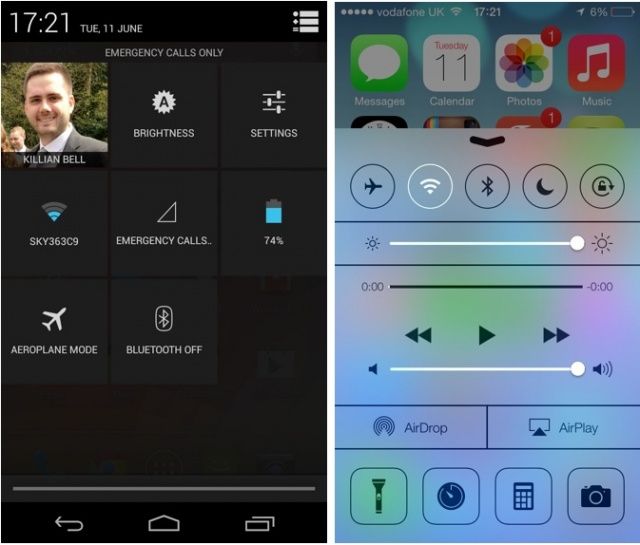
3. The New Control Center Android Right IOS Left

control-center
Image Credit: http://cdn.cultofandroid.com/wp-content/uploads/2013/06/Screen-Shot-2013-06-11-at-17.28.05.jpg

This control center is a COMPLETE knockoff from that of the Android. It also looks just like that of Android 4.1.2 on the Samsung GS3.

4. Apple's Music Interface Is Now Very Similar to that of Androids

Apple changed the color scheme and interface in Music to look an awful lot like Google's Music for Android.

5. Safari Tabs Are Now Very Similar To Google Chrome's

Safari's tabs are now 3D panels, just like Google's Chrome browser for Android.

This is the one that I feel was done on purpose without a doubt. When you look at the current tabs, and see the difference and then look at Google Chrome, you will see that they are copies of eachother.

6. IOS Calendar Uses Very Similar Color Scheme Just Like The Google Calendar

Like Android's Calendar, the new iOS Calendar uses a bright white background and a pastel color scheme to represent allocated time slots.

7. ICloud Keychain Syncs Just Like Google Chrome

Apple has now developed a sync for all of your passwords so that you wont need to reenter then on your phone.

8. Dynamic Backgrounds


There are now dynamic backgrounds for IOS 7. This attempt of "innovation" was another copy from that of Android. 

9. Automatic Updates


Finally Apple has added the feature for you to automatically update all of your apps, and use the exact same settings as an Android device.

Summary
As we can see these are examples of Apple "borrowing" ideas from Google. However, if Apple can sue over the way a phone looks, then Google can sue for blatant attempts of the copying their software.


Read More
Posted in Apple | No comments

Friday, June 21, 2013

Jumpshot Review

Posted on 4:02 PM by Unknown


Jumpshot is a little program that was funded through kick starter with a very simple idea. The idea was to create an all in one fix it tool for your computer. Jumpshot was able to do it, and they did it in a friendly fashion. Jumpshot uses these cartoon characters to explain what the program does. Lets take a look at the inner workings of the program known as Jumpshot.


Features

  • Kills Malware. Jumpshot has it's own malware removal tool.
  • Deletes Junk Files. Jumpshot it able to remove useless files that are stuck on your computer.
  • Check For Windows Updates. Jumpshot compares your computer's updates to that publicly released by Microsoft.
  • Detects failing Hardware. Jumpshot will check your computer for windows errors and warn you about them to prevent data loss.
  • Fixes startup. Jumpshot will check your computer for start up items that take abnormally long time and either disable them or place them on delay.
You can see more information about Jumpshots' features here. http://www.jumpshot.com/

My Experience
When I downloaded Jumpshot I gave the program 3 tries to work without using their simple UI version. Jumpshot failed to clean my computer after all 3 tests. I then proceeded to use their Simple UI, and it hang after three more tests. I gave Jumpshot 5 minutes, and it froze at the same point, now unless the program takes more than 5 minutes to start the cleaning process, then they need to work on that. However it didn't work because everytime Jumpshot told me that they were unable to clean my computer and asked to restart the process. This program sounds great on pen and paper, but if it fails after 6 different tests, then there is something fundamentally wrong. Maybe the program is not fully windows 8 compatible. Maybe the program is broken. I don't know the source of the problem, but there is a problem that needs to be sorted out.

Issues To Be Fixed
  • Fix start up issues.
  • Allow the users to control what is being fixed.

Read More
Posted in Data loss, Jumpshot, LeBron James, malware, Miami Heat, Microsoft, Shareware, Windows Update | No comments

Thursday, June 20, 2013

Xbox One Game Prices

Posted on 11:35 AM by Unknown
Yes there is no an "official" price for Xbox one games. When it comes to setting the prices of these games, the prices are generally set by the developer of the console. Microsoft has announced that Halo 5 will be only $60 which was the same price as halo 4. The critically acclaimed Call Of Duty Ghosts will also be $60. Why are the prices set at this price? What about the PS4? Let's Find out.


Why $60
This is actually a price that I was expecting, and that is because it is becoming cheaper to produce games. Now some of you are wondering, how is this cheaper when it is the same price? The answer is simple these next-gen games are expected to be on more powerful engines, better graphics would be included with this engine, and the combat will be more dynamic. Now as an example when the PS 3 was released it was roughly $700 the PS 4 which has far better specs will be $400 see this is a better product, and it is cheaper than the initial cost of the less powerful version. Not to mention Microsoft is trying to keep costs down to sell more copies. When it comes to games it matters how many you can sell rather than the price of which the game is set to.

What About The PS 4?
Well good news for you, the PS 4 games will also be $60. The whole gaming market seems to be at that point of equilibrium, and they want to keep there are as long as they can. Now SONY has been hiding one piece of information from people and that is that YOU DO NEED TO PAY FOR MULTIPLAYER. A common misconception is that you won't need to pay for internet on the PS 4 well  you do unless you are playing on the same network. They want to keep the price the same, because people are already accustomed to the Xbox live prices. A yearly cost for Play Station Plus will be $50. Now the real question is can SONY get away with this? SONY in the Past has had a ton of issues with their Play Station Network being hacked and that is because they are less secure than Microsoft.

Summary
All games will cost $60 for these consoles, and the PS 4 will require a $50 a year subscription. Now these are the games from the consoles respective developers special editions of games we are expecting to cost around $80 and more depending on the game. Let's see how the game developers will react to these prices and whether they will stick with them. We will also see if PS 4 fans will rage over the Play Station Plus or if they will adjust and accept the new changes or if they will be up in arms.
Read More
Posted in Microsoft | No comments

Microsoft Backs Down on Xbox One Always On Internet

Posted on 10:52 AM by Unknown
Yesterday Microsoft announced, that they were making some changes to the XBOX One. These new changes are what we wanted to hear, and they were relating to the always on Internet, and the process of trading, reselling, borrowing games from each-other. Microsoft has now backed down on their earlier statements, and while this helps them does this hurt SONY, and their main focus of the product. Let's explore the changes, and contemplate why it is they did this change.


Always On Internet
Microsoft before and during E3 stood by the idea of having an always on internet connection. However, they now have stated that " "An internet connection will not be required to play offline Xbox One games – After a one-time system set-up with a new Xbox One, you can play any disc based game without ever connecting online again. There is no 24-hour connection requirement, and you can take your Xbox One anywhere you want and play your games, just like on Xbox 360." This announcement was terrific for gamers, but lets see how the developers will respond. Before Microsoft announced this change, they contacted various developers, but we have not heard any public response from them as of now. The interesting thing, is that Microsoft was so confident in the idea, but the root of this change might be SONY. During E3 SONY almost mocked the Xbox One for requiring an always on internet. After which SONY had a huge boost in support by gamers, and for good reason. Now Microsoft has changed to accommodate those gamers who sided with SONY. 

Trading, Selling, Borrowing Games
Microsoft also made it clear that selling used games or buying them would be very difficult and nearly impossible to trade the games between friends. However,Microsoft has back tracked those earlier comments and has now announced that "Trade-in, lend, resell, gift, and rent disc based games just like you do today – There will be no limitations to using and sharing games, it will work just as it does today on Xbox 360." Now we will be able to do everything like the Xbox 360. The reason for this, is Microsoft has realized that people do buy a lot of Used Games. This is going to bring in more revenue, in theory because now they have attracted a larger market.

Summary
Now that Microsoft has backed down those earlier comments, and we have the right to trade our games and use them without internet access what will they do next. If Microsoft continues their old stunts they will insult the other product and end up out selling them using their heavily aggressive advertising strategies. What of the game developers? What about the DMCA? Will any of them give us an announcement? As it looks right now, we will not receive any major announcements.
Read More
Posted in Gamer, Internet access, Microsoft, SONY, Trade, Xbox, Xbox 360, Xbox One | No comments

Tuesday, June 18, 2013

Virus Total Uploader Review

Posted on 9:54 AM by Unknown
Apple G5s at the Lange Nacht der Wissenschafte...
Apple G5s at the Lange Nacht der Wissenschaften 2006, de:HTW-Dresden (Photo credit: Wikipedia)

Virus total which was bought by Google has a great tool, which allows any user to submit a download up to 32mb to be scanned by 40+ antivirus engines. The best thing about this tool, is it allows you to scan downloads before they get on to your computer, and it lets you know whether it is safe for you to continue with that download. This tool is a great way to improve your computer's security while also not using a lot of space on your computer. However there are some issues with this product, and we will go over them.


Features

Submit before download: This allows a download to be submitted before it touches the hard drive. What virus total did was allow the download to pass through the memory so that your computer is safe from any malicious files during the scan.

Submit Any File: Virus total also allows you to submit any file or folder up to 32mb for scanning. This is a great way to make sure that you don't have any form of ransomware on your computer. For instance if you downloaded a new toolbar and want to make sure it is safe. You can upload it right from your computer and virus total will scan the item to tell you if it is safe or if it has been detected as malware.

Upload a Process: Virus total can submit a process running on your computer. So if you believe that their is a malicious item running. This is such a useful tool especially if you don't know what is running on your computer.

Issues

You may only submit 32mb at once: The issue with this is the website allows you to submit up to 64mb so why not allow us to use the full 64mb that we get from the website?

You can only submit 1 file at a time: The biggest issue with virus total uploader is that you may only submit 1 file or folder at once. This can greatly slow down the time it takes to check a new program which is why I recommend that you only submit the install file.

Why Did Google Buy It?

Google bought the company for it's relationship with antivirus companies. What Google needs to do is start using this scanner for all of the Android apps that are submitted. If they fail on any of the tests then they should have to resubmit the app after the issue was resolved. Google has not done with the company and has basically let it sit there which is very sad, but there might be a reason for it. When Google first bought the company they did not really announce it so everyone knew and that might because they have something cooking with it. Maybe they are going to shut the idea down, who knows but what I do know is that Google needs to start utilizing this tool.


Related articles

  • PhrozenSoft VirusTotal Uploader 2.0 is out !
  • What Is A Trojan:JS/Seedabutor.B
  • Trojan.Zbot!gen41
Read More
Posted in Anti-Virus, Google, malware, security | No comments

Saturday, June 15, 2013

5 Security Tips to Help You Maintain a Secure Website

Posted on 10:26 AM by Unknown
You might not think that your site holds potential value for a hacker, but if you think you run a secure website, you might want to think again. Cyber criminals hack websites every day, and they are becoming more sophisticated with their techniques, making website security of paramount importance. Many website security breaches are out to get access to your email to send out spam or to create a temporary web server to circulate illegal files. If you want to be proactive and safeguard your domain and online reputation, here are five essential security tips you should follow:

1. Ensure Your Software Is Always Up To Date

This applies to server operating systems and any software your website’s content management system might use. If there are security holes in your software, it is much easier for criminals to gain access to your site. If you use a CMS or third party software, you should be particularly careful about your updates.

2. Pay Attention and do Routine Checks

A hacker could use scripting code to run malicious code on your website, send your data and do routine checks to ensure the validity of your pages and other data within your site.

3. Don’t Give Too Much Information Away

This is especially important when it comes to password-protected access areas of your website. Your error message should not indicate whether the user got the email or the password wrong, otherwise the hacker has a better chance of working the right combination out.

4. Maintain Your Passwords

Every website user must use a strong and complex password as part of your website’s security protocol. The minimum recommended requirement is usually at least eight characters, incorporating a combination of uppercase and lowercase letters and numbers, if you want the passwords to provide a decent level of protection. All users should also change their passwords on a regular basis.

5. Beware of File Uploads

Allowing website users to upload forms to your website could compromise your website security in a significant way. Even if the file itself seems safe, it could contain scripting which could make your website vulnerable to security threats. Image files pose one of the greatest threats and should be treated with care. As a website owner or manager, the question you should be asking yourself if whether the risk is worth the benefit. While there are steps you could take to minimize your risk and handle the files carefully, the safest route is not to allow them to be uploaded in the first place.

This Article Is Brought Was Written By Enrica. View There Website Here

Related articles

  • Free Website Security Badges
  • Securing Your Computer For Free Complete Guide
  • Understanding Types Of Hackers
Read More
Posted in security, Website | No comments

Wednesday, June 12, 2013

360 Mobile Security Review

Posted on 3:21 PM by Unknown
android
android (Photo credit: Saad Irfan)

Qihoo has released a new app for Android, and it is named 360 Mobile Security. This app as you can guess is an antivirus for your phone that uses a strange tactic to find malware. Qihoo uses their engine, and a cloud based engine to scan your phone. The best thing about this for you is better detection rates, and more ways to check the app for malware.


Features

Antivirus Scanner: This is the obvious item for every antivirus software on the market. It comes with a quick scan, and a full scan.

Antivirus Protection: 360 Mobile Security will actually monitor your device for malicious apps, acts, and messages that might contain malicious links. So as you can guess this is a very powerful antivirus and that is true, but there is more.

Vulnerability Scanner: This is the strange item, this app will scan your device for vulnerabilities found in the OS custom or from Google and protect those vulnerabilities.  I used on Jellybean 4.1.2, and it found 2 vulnerabilities, they were mostly the spam messages, and now it protects me from those.

Those are all of the features for this app. Considering it was released last night this is a good start for them. I have submitted a report to them regarding new things that they can add to the APP, and we will see what happens. This app can go either way, it will either be the next big thing or it will end in disaster and will be shunned out.

Is It Safe?
Yes the app is safe, I was testing their antivirus on my computer, and the only issue was a false positive from VIPRE. The mobile app is safe and later today their Antivirus Software will be safe. This is according to 40+ antivirus companies so who knows but yes I am using the app right now because I want to see were this is APP is heading. While the app is new and lacks features, it does have a powerful AV engine. I recommend that you check it out on the Android market place.

Related articles

  • Top 5 Free Android Antivirus Apps
  • Kaspersky Mobile Security Review
  • Android Smartphone Security
Read More
Posted in Android, Mobile security, security | No comments

Friday, June 7, 2013

Kaspersky Mobile Security Review

Posted on 10:05 PM by Unknown

Kaspersky mobile security is an antivirus apps that has a powerful antivirus engine and has all of the features that you need for an antivirus app. The only thing that might set you off is the 15 - 20 dollar price tag. However with it being a one time purchase you will save money as apposed to other antivirus apps.

Features


Web Protection: Kaspersky has one of the best antivirus engines around scoring 100% on the latest AV-Test they have also done consistently well and are one of the top competitors in the industry. from my experience their web protection is second best, and is only barely beaten out by Bitdefender. These two companies have the best web protection and Kaspersky was able to show this even in their mobile app.

Antivirus: While the antivirus is not very different then other apps, you will be more secure using Kaspersky rather than some unknown antivirus app. Not only does this app come with the basic features Kaspersky implemented a password so that  Kaspersky will not be harmed by any other apps or from you.

Anti-theft Protection: When it comes to Anti-theft the results and the tracking that you receive from Kaspersky are hard to beat. While it is not the best that I have seen I feel that it is one of the top 5 for anti-theft apps.

Call & SMS Filtering: Kaspersky gives all users the ability to block calls and texts based on the number. While this is not the best way to filter out messages it is still the most effective way to filter out these spam messages. While the carrier already does this, you might want to use this to block someone who you don't want to contact you. This is the main thing that Kaspersky needs to work on.

Privacy Protection: Kaspersky has one of the best Privacy protection features of all Android Antivirus apps and this is because it is so simple. It is also so effective because of the ability to hide certain numbers from your contacts list so that only you can see them. You will want to use this if you don't want your friends or anyone else reading certain messages that you are sending. You might also use this for a business sense were you and your boss are sending important information via SMS so you will want to prevent anyone that should not be reading it from reading it.

Summary: If you are looking for a paid antivirus app for your Android device then Kaspersky is hard to beat. The app comes with all of the features that you need from an antivirus app, and it is one of the most powerful antivirus engines on the market. The engine coupled with the very nice privacy features than Kaspersky mobile is one of the best paid antivirus apps on the market.
Read More
Posted in Product Reviews | No comments

New Gmail App Update

Posted on 9:39 PM by Unknown


Google has recently released an update for their Gmail app and it has completely redone the UI and this is one of those things that you will either love the new UI or you will completely hate the new UI and will try to roll back. However,there are some changes that I have wanted for a long time and I am glad they are in.

Changes to the UI

The new UI is very similar to the old UI however now there is a giant letter in the front of the email which is a way that they are labeling these posts. I would give a visual, but I want to hide my emails and the senders. However, I recommend that you do download the newest update from the Google Play Store. These updates are better and while the new look can take a minute of getting used to I want to set something clear. However, I feel that the changes are being exaggerated and that people are still not accustomed to the change that Google is trying to push, and the thing that people need to realize is that Google does not care.

You Can Still Delete The Messages

A lot of people are under the illusion that you can no longer delete message, however there are still a lot of ways of doing this. My favorite way of deleting messages is to go into the general settings for Gmail and set it up so that when you swipe them away they will be deleted. This is also the fastest way for you to delete those old emails and to delete all of the spam mail that you might have. As soon as the community calms down and realizes that this is the direction that Google wants to head then we will all be in a better place.
Read More
Posted in Android, Google, Product Reviews | No comments

Thursday, June 6, 2013

Guest Posting Guidelines

Posted on 10:48 PM by Unknown

Thank You For Wanting To Guest Post for The Daily Exposition or any of our affiliated websites. We are glad that you have taken interest in submitting an article for us.

Becoming A Guest Poster For The Network


As a guest author you bring your voice to a new large audience, building your profile and credentials.You also get to add 2 links to your blog, website or anywhere you choose (With some exceptions) added to the post so you really are reaching a new audience, and as the primary readership of this Blog is people who keep their own Blogs you are connecting with like minded readers.The links are added as do-follow in an about the author section below the post.Self serving links are not allowed in the main parts of the post.


Guest Post Topics 

  • Computer Security
  • Product Reviews
  • Technology News
  • News In General
  • Video Games
  • Website Widgets
  • Science
  • Submitting a video. (You can submit a video without an article)
  • Anything School Related (Answers to homework, scholarship news) No GOSSIP WE ARE WRITERS HERE
  • Tips for consumers, E-Consumers
  • Business
  • Money saving tricks
  • Have another type of post? Submit it and I will return with an answer 

GUEST POSTING RULES & GUIDELINES MUST FOLLOW

  • We shall not edit or modify your post content in any case; it can either be approved or rejected. We will communicate to you accordingly. In some cases if modification and editing needed that would take place.
  • Content of the post must be original, and should not be reproduced anywhere else, even in your own blog/site before and after it is published on the network. Plagiarism will not be accepted at any cost.
  • Grammatical error, usage of unprofessional language and irresponsible comments shall lead to rejection of the post.
  • The posts must be first heard and not published elsewhere and must contain at least 500 words.
  • Kindly avoid copyright infringement and come up with your own content. SUBMIT YOUR POST
  • Please include the post in the body of the email itself, or as an attachment in .txt, .doc or .docx format. Also attach the image for your post.
  • Please include a sampling of your previous work ie. links to 2–3 blog posts you have written.
  • We will not contact you if we find minor grammatical issues.

How To Reach Us

If you have a post that meets the guidelines, and want to send your proposal then use our contact us page or any of the emails listed below.

scotth0407@gmail.com            I receive a lot of emails daily here, you are better using one of the below.
scotth0407@outlook.com        Recommended
scott.hartley67@gmail.com       Recommended
Contact Us Page                       Recommended
    Read More
    Posted in | No comments

    Tuesday, June 4, 2013

    Top 5 Free Android Antivirus Apps

    Posted on 11:00 PM by Unknown

    For those of us that have an Android phone we know that there are a lot of infected apps on the market and that we are most likely to get malware because of Android being the most popular mobile operating system. However most of us want our phones want to be protected at no cost to us, well today I will give you my top 5 list for the best free Android antivirus apps.

    1. Comodo Mobile Security

    Comodo mobile security is our choice for best free mobile security, and that is for good reason. Lets just go over the features that come with the app.
    Features:
    • Antivirus: Comodo will watch the phone for unsafe process' or apps trying to step outside of their "box". You may also scan the whole phone at any given time from the menu.
    • App Locker: Comodo comes with a built in app locker that locks apps with a password of your choosing.
    • Back Up Apps: You may backup your apps to the SD card so that you may install them again if you get a new phone.
    • System Optimizer: Comodo comes in with a built in task manager to show you all of your running apps. The best thing is that this program is not to powerful and will only show active apps not memory resident. Comodo also comes with a built in cache cleaner so that your phone is always running in tip top shape.
    • Task Scheduler: You may schedule Comodo to scan your phone at a given time.
    • SMS and Call Blocking: Comodo allows you to block certain numbers or even texts that contain certain keywords. This used in the right hands will prevent you from receiving spam texts.
    • Privacy Protection: Comodo has a private space were you may only view certain texts from people. For instance if you are receiving important bank information, then Comodo will protect it in this space so that only you may see them.
    • Privacy Advisor: Comodo has this feature so that phone owners will be able to see what permissions an app is claiming. For instance did you know Angry Birds tracks your location? Well now you do, and you might not be comfortable with them doing this. However, this feature does more than just check permissions it will be able to detect apps that are collecting too much information and will label them as unsafe.
    • Anti-theft Protection: Comodo gives you the ability to track your phone if lost, and send codes to wipe and do far more to protect your privacy.
    • Firewall: The rarest item for phone Antivirus apps and it is one of the most important. If you root your phone then Comodo will be able to monitor all connections and it will be able to control whether or not certain connections are safe.

    2. Avast Mobile Security

    Avast while lacks the features that you would get from Comodo still has very strong protection and such a simple UI that anyone could navigate. 
    Features:
    • Antivirus: Avast is well known for their shields and they don't skip here the problems are that they still seem to be adding some which is concerning, however you will be safe with Avast.
    • Anti-theft: Avast has the best Anti-theft module of any antivirus program that I have tested. From my testing it was nearly dead on every time and the management from your Avast account.
    • SMS and Call Filtering: Avast is able to block numbers from contacting you and it can prompt you on every message from an unknown sender.
    • Privacy Report: Avast will scan all apps and tell you what their permissions are. This is not as effective as Comodo's however it is still nice to get this feature.
    • Firewall: Avast comes with a nice firewall, but it can be complicated and you don't need to worry about this unless you know how to properly manage a rooted Android phone.

    3. Norton Mobile Antivirus 

    Norton mobile does offer a free antivirus version of their program, however it does lack a lot of features. However the one thing Norton has always done well with, was antivirus protection. Norton does find a ton of malware and does a good job with detecting and analysing malicious apps. These are the reasons that I can recommend Norton. While it lacks features it makes up for it with really nice protection and being a light program.
    Features:
    • Anti-theft: Norton provides all free users with a very nice Anti-theft module.
    • Antivirus: Norton has a very high testing results and allows all of the basic scans that you get with any antivirus app.

    4. Bitdefender Antivirus Free

    Bitdefender lacks all the extra features of the above features but offers "unparalleled" protection. Bitdefender is the best scoring antivirus for your Windows Computer, and your Android device and while it has good protection it needs more features. Generally a program that does more gets more downloads Bitdefender has the fact that it is a powerful antivirus, and that is about it.
    Features:
    • Antivirus: Bitdefender has the best antivirus in the industry (according to lab tests) and that is true for its mobile device as well. However it lacks the web protection which you get with their paid version which is why it got a poor rating.
    • Autopilot: Bitdefender loves their autopilot and that is were the app will scan all new apps and perform regular scanning of all apps. However, Bitdefender needs to expand this so that it can monitor those apps.

    5. Kaspersky Mobile Security Lite

    Kaspersky is one of those antivirus companies that I have come to trust for protection, while they don't have the best they are still very strong with protection which is why I would argue them and Bitdefender are at a tie. This app has more features than Bitdefender but has worse protection which is key when it comes to Android protection.
    Features:
    • Antivirus: This is very similar to Bitdefender were they limit your protection. However, the protection is still very strong as long as you do regular scans.
    • Anti-theft Protection: Kaspersky has a very useful Anti-theft protection module and I hope everyone that is using the program actually uses the feature.
    • Call & SMS Filter: Kaspersky allows you to block certain numbers from calling or texting you on a by number basis.
    Summary
    When it comes to mobile security no matter what app you are using, you are better than the guy next to you who is not using one. You need to remember to only use trusted companies, and if you are not sure whether or not they are trusted "Google it" or remember the names of major antivirus companies.

    *I did not recommend AVG because I have had bad experiences with them, but it is still a very nice app to use so please don't feel like I skipped them out of hate.*
    Read More
    Posted in Android, Product Reviews | No comments

    Search Results

    Posted on 11:06 AM by Unknown
    Read More
    Posted in | No comments
    Newer Posts Older Posts Home
    Subscribe to: Comments (Atom)

    Popular Posts

    • Gaming Communities
      Many gamers out there are looking for quality content and are looking to get their name out there. Now what if I said I found a website that...
    • What Is Adware
      Adware one of the most commonly misunderstood form of malware right next to the common virus. The issue with Adware is people try to assume...
    • What Is Quick Scoping
      Many people in call of duty say that they are good at quick scoping, and many people don't know what this is. So in this article I will ...
    • Which Internet Browser Should I Use
      Most people have heard of the big 3 or 5 internet browsers . However many of you don't know of the many other internet browsers out ther...
    • Youtube Monetization Not Available In Your Country
      As we all know today thousands maybe millions of users are not able to monetize their newly submitted videos. Now Google at the time of this...
    • Free Online Classes
      Coursera is a website that offers college classes for free to anyone who knows how to use the internet. They started this website under the ...
    • Tera Sorcerer Skill List
      Before I go into the full skill list let me break down what the sorcerer is. The sorcerer in Tera is a character of mass destruction. They a...
    • Black Ops 2 Review
      Black-ops 2 is another game in the well known Call of Duty series. This game is a lot like all the other games it has multiplayer, and it is...
    • Internet Browser Test Results
      From my last post on this issue someone pointed out that it looked like I was favoring Google Chrome. Now while I like its UI the best it sc...
    • Attention All Bloggers Sociable Ad Ware
      Many bloggers use the app known as sociable which allows people to share their site with a click of a button however from my recent testing ...

    Categories

    • 2013
    • 2013 Total Security
    • Android
    • Anti-Virus
    • antivirus
    • Apple
    • Asynchrony
    • Bitdefender
    • Bitdefender Wallet
    • Blackberry
    • Car dealership
    • cloud storage
    • CNET
    • Computer Support
    • computers
    • coupons
    • CX
    • Data loss
    • Direct selling
    • Download
    • Editor's Choice
    • forums
    • free software
    • Gamer
    • gaming
    • general
    • Google
    • HTML
    • internet
    • Internet access
    • ios 6 jailbreak
    • iOS 6.1 Jailbreak Tweaks
    • Jumpshot
    • LeBron James
    • Linux
    • Loader (computing)
    • loading
    • malware
    • malware encyclopedia
    • Miami Heat
    • Microsoft
    • Mobile security
    • Nokia
    • PageSpeed
    • Personal computer
    • Play Station 4
    • Product Reviews
    • Program
    • Programming
    • science
    • Searching
    • security
    • Servers
    • Shareware
    • SONY
    • technology
    • Tesla
    • Tesla Motors
    • top 5 ios
    • top 5 ios 6 cydia tweaks
    • Trade
    • videogames
    • Web page
    • Website
    • White House
    • Windows
    • Windows 8
    • Windows Update
    • worm
    • Xbox
    • Xbox 360
    • Xbox One
    • Yahoo
    • Youtube

    Blog Archive

    • ▼  2013 (170)
      • ►  September (15)
      • ►  August (13)
      • ►  July (13)
      • ▼  June (16)
        • Google Adds Async To Adsense Ads
        • White House Petition Supporting Tesla Motors
        • Avg Cleaner Review
        • Bitdefender Photon Is Released
        • Apple's IOS 7 Did Borrow Features From Android
        • Jumpshot Review
        • Xbox One Game Prices
        • Microsoft Backs Down on Xbox One Always On Internet
        • Virus Total Uploader Review
        • 5 Security Tips to Help You Maintain a Secure Website
        • 360 Mobile Security Review
        • Kaspersky Mobile Security Review
        • New Gmail App Update
        • Guest Posting Guidelines
        • Top 5 Free Android Antivirus Apps
        • Search Results
      • ►  May (29)
      • ►  April (28)
      • ►  March (30)
      • ►  February (22)
      • ►  January (4)
    Powered by Blogger.

    About Me

    Unknown
    View my complete profile